
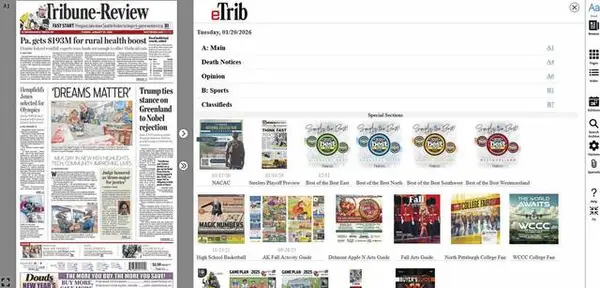
TribLive’s electronic edition — the eTrib — offers readers the news they have always enjoyed in the print format but in an electronic manner.
The news is delivered in a newspaper-style, printed-page experience on your desktop, mobile or tablet device.
It is easily accessible via TribLIVE.com — or directly at e.triblive.com — and the eTrib app found in your app store.
Your login credentials should apply and take you directly to the site. A seven-days-a-week digital access is included with your paid subscription.
Here’s a quick guide to getting started:
Already a Tribune-Review subscriber? Register your account at MyAccount.TribLIVE.com. Your MyAccount login will apply to your e.TribLIVE.com account.
New subscriber? Visit subscribe.TribLIVE.com and select the appropriate option. The username and password that are used when you subscribe will apply to your e.TribLIVE.com account.
To access eTrib, visit e.TribLIVE.com and click on the edition you would like to read.
If you are prompted to log in, type your username and password in the appropriate boxes. If you cannot remember your login, select ‘Forgot My Password” and follow the prompts.
Here are some quick navigation tips once you have the eTrib launched:
On the right side of the screen, you’ll find various tools to enhance your experience.
• “Aa Read” at the top will bring up the newspaper in text-friendly format.
• “Browse” will launch the page-view reading experience and zoom in on the top of the page. You can move around the page using your mouse and dragging to the story or photo you want to view.
• “Pages”: Displays thumbnails of all pages in the current edition. You can select a page to view or choose pages to download or print.
• “Index”: Returns you to the initial landing page, where you can navigate to pages or special sections.
• “Editions”: Allows you to switch between editions (Westmoreland or Valley News Dispatch) and select different publication dates. Up to 30 previous editions are available, and you can search the archive.
• “Search archive”: Provides access to content older than 30 days.
• “Options”: Takes you to account settings and additional navigation tools.
• “Specials”: Provides links to available special sections.